




What is Autopilot mode?
เผยแพร่เมื่อ: 23 ก.ค. 2569 · ศูนย์ข้อมูล · 1 นาทีในการอ่าน

What is Autopilot mode?
For all the users who want nothing more from their security solution than to be protected without being bothered, Bitdefender has been designed with a built-in Autopilot mode.
While on Autopilot, Bitdefender applies an optimal security configuration and takes all security-related decisions for you. This means you will see no pop-ups, no alerts and you will not have to configure any settings whatsoever.
In Autopilot mode, Bitdefender automatically fixes critical issues, enables and quietly manages
- Antivirus protection, provided by on-access scanning and continuous scanning.
- Firewall protection.
- Privacy protection, provided by antiphishing and antimalware filtering for your web browsing.
- Automatic updates.
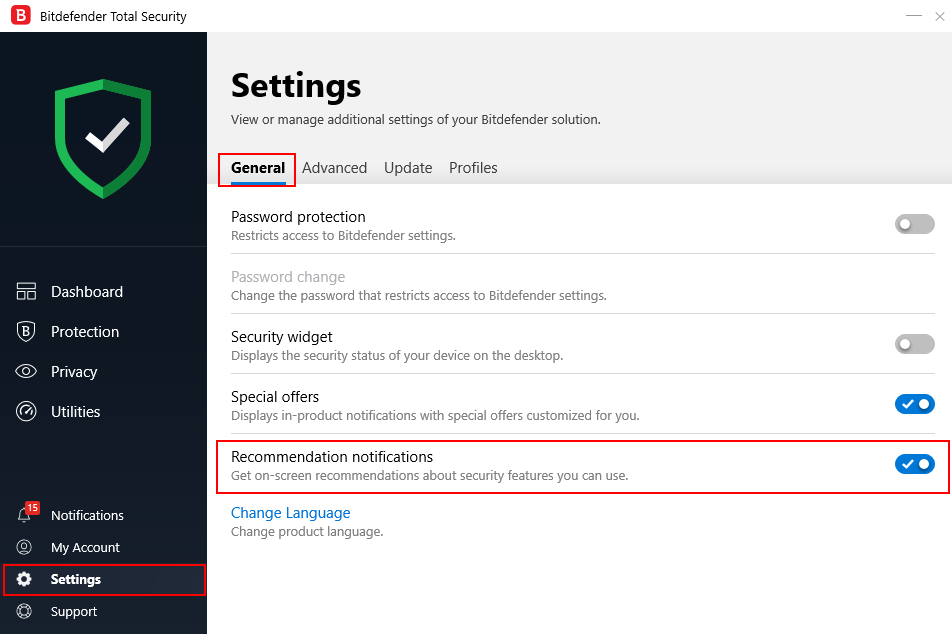
To turn the Autopilot on or off, follow these steps:
1. Open the Bitdefender window.
2. Click the Settings / General tab then enable Recommendation Notifications