Stop phishing, business email compromise and ransomware before they turn into breaches. A secure email gateway at the perimeter and API-based protection inside the mailbox, both managed from the GravityZone console your team already uses.
0%Report more BEC attacksof security leaders, over the past year (Bitdefender Cybersecurity Assessment Report 2025)
0+Filters on every emailapplied to every single message the service processes, inbound and outbound
0,000+Behavioural algorithmsreading over 130 variables in each message before it is let through
0New threats a minutediscovered by Bitdefender Labs across the global protective network
Capabilities
Modern email security, built to stop today's attacks
Gateway filtering alone is no longer enough. Protection extends into the mailbox, so threats that evade the first filter are still found and removed.
Real-time visibility into email risk
One view of what is arriving, what was blocked and what is still sitting in mailboxes, across every user and domain. Post-delivery monitoring keeps that picture current, so investigation and containment start early and dwell time stays short.
Email authentication
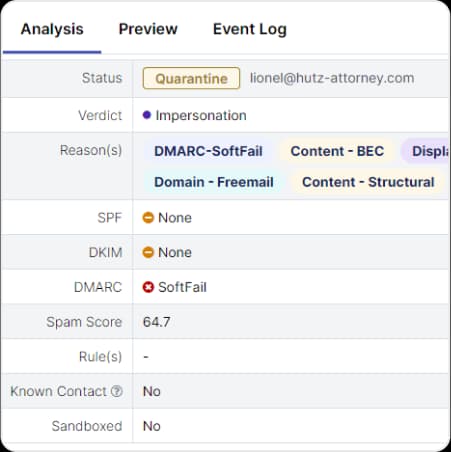
Built-in support for SPF, DKIM and DMARC enforcement. These are the protocols that stop someone sending mail that claims to come from your domain, and they protect the sending reputation you have built up. Each verdict is recorded against the message so a decision can be explained later.
Message tracing and mail flow control
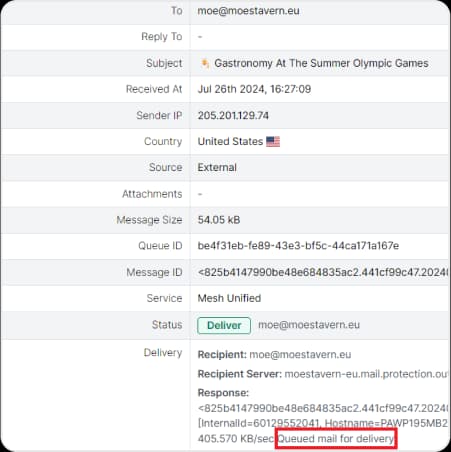
Every message carries its full record: sender, source IP, country, size, queue and the delivery response from the receiving server. That is what turns "did this email arrive?" into an answer rather than an investigation, and it is the same detail the policy engine filters on.
Outbound email scanning
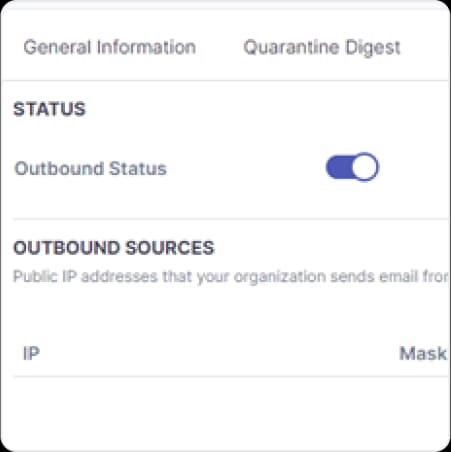
Every outgoing message is inspected for malware, spam and the signs of a compromised account before it leaves your network. That is what keeps your domain off blocklists and your sender reputation intact.
Multi-layered protection and scanning
Business Email Compromise and impersonation protection catch the social engineering, phishing and impersonation attempts that get past a traditional spam filter.
Zero-day and advanced threat protection, sandboxing and AI-powered analysis handle both known and unknown email threats.
Signature-based engines run alongside behavioural detection, which defeats new malware packing techniques automatically.
Graymail filtering
Newsletters, bulk marketing and other harmless but distracting mail are separated out before they reach the inbox.
Staff keep their attention on real business correspondence.
The security team stops fielding complaints about inbox clutter.
End-user quarantine digest
Users get an on-demand digest of their own quarantined mail and can release a message themselves.
Administrators stay in control through policy-based permissions that decide who may release what.
Fewer release requests reach the IT queue, which is where most of the day-to-day email workload comes from.
Seamless integration with Microsoft 365
Native, API-based access gives full visibility and control across user mailboxes.
Automated directory synchronisation through Entra ID keeps provisioning aligned with your organisation as it changes.
No mail flow changes are required, and remediation can retract a malicious message across the whole organisation at once.
Flexible deployment
Three ways to put it in front of your mail
Built for modern environments, with a dual-layered architecture: filter at the perimeter with a secure email gateway, protect inside the mailbox over the API, or run both. Deployment and visibility work the same across email systems, so the choice follows the customer's setup rather than ours.
These are the service names the console reports against each message, so what you pick here is what you will see in a message trace later.
Mesh Gateway
MX based
Mesh 365
API based
Mesh Unified
MX and API based
Recommended
Deployment
Protect the perimeter, the mailbox, or both
What each route actually involves, start to finish. You can change your mind later without reinstalling anything.
Fastest to deploy
API-based, inside the mailbox
Integrated Cloud Email Security. Connects to Microsoft 365 through the API and monitors mail after delivery.
1Authorise the connection to your Microsoft 365 tenant.
2Let directory synchronisation through Entra ID pull in users and domains.
3Set policy, then let post-delivery monitoring detect and retract threats that got through.
Secure email gateway, at the perimeter
MX-based filtering that stops threats before they are ever delivered. Works with any email provider, cloud or on-premise.
1Change your MX record so inbound mail routes through the Cloud Email Security servers.
2Configure a smart host so outbound mail routes back out the same way.
3Set the policy engine on mail flow, then review what the filters are catching.
Recommended
Both layers together
Pre-delivery filtering and post-delivery detection covering the full attack lifecycle.
1Deploy the gateway so the bulk of the volume never reaches a mailbox.
2Add API protection so anything that evades the filter is still found in the inbox.
3Apply stronger controls where exposure is highest, by domain, department or individual.
In detail
Everything the service does
The full capability list, including the controls that decide whether it is workable day to day.
19 capabilities
Everything the service does
Capability
What it does
1Threat detection6 capabilitiesWhat it finds, and how.
Catches fraud that carries no malware at all.
Detects social engineering, phishing, credential theft and impersonation attempts, including CEO fraud, where the message contains nothing a signature-based scanner would flag.
Stops what has never been seen before.
Sandboxing and AI-powered detection analyse unknown attachments and payloads, so a threat with no existing signature is still stopped.
Signature and behaviour together.
Traditional signature-based antivirus engines run alongside behavioural detection, which automatically defeats new malware packing techniques.
Over 10,000 algorithms per message.
Behavioural analysis alone applies more than 10,000 algorithms across over 130 variables extracted from every email message.
Re-checks the link when the user clicks it.
Links in messages are rewritten and checked at the moment of the click, whether that is seconds or days after delivery. Reputation services combine with real-time page content analysis, and the user sees a block or a warn-and-continue page.
Catches the compromised account.
Detects internal attacks and accounts that have been taken over, which perimeter filtering by definition never sees.
2Mail flow and policy5 capabilitiesControl over what moves, and where.
Filter on the attributes you choose.
A policy engine controls email delivery and message filtering on a set of attributes including size, source, destination and keywords.
Stronger rules where the risk is.
Policies can be customised by role, exposure and business impact, so finance and executive mailboxes carry tighter controls than the rest of the organisation.
Several providers, one domain.
Complete control over mail flow, with support for multiple email providers inside a single domain.
Inspects what you send.
Filters and controls content in outbound messages, protecting sender reputation and preventing data leaving the organisation.
Remove a message from every inbox.
Where API protection is deployed, a malicious message that reached mailboxes can be retracted across the entire organisation in a single action.
3Data protection and compliance4 capabilitiesEvidence, encryption and the audit trail.
Keeps confidential content in.
Helps protect confidential information leaving the organisation by email and simplifies compliance obligations around it.
Encrypted server to server.
STARTTLS with TLS enforcement means mail between servers is encrypted in transit rather than only when both ends happen to support it.
Mail flow, rules and actions.
Charts cover mail flow, which rules were triggered and what action was taken. Standard reports ship with the console, and custom reports and alerts can be built on specific triggers.
Archived automatically after 90 days.
A detailed audit records actions and triggers, and logs can be archived automatically after 90 days.
4Administration4 capabilitiesWhat running it actually costs you in time.
Users release their own mail.
Self-service quarantine with on-demand digest reports. Users release messages themselves while administrators keep control through policy-based permissions.
Provisioning stays current.
Automated directory synchronisation through Azure AD, now Entra ID, means new starters and leavers are reflected without a manual step.
Several organisations, one console.
Centralised management across tenants, which is what makes the service workable for a group of companies or a service provider.
Email telemetry feeds the platform.
Email telemetry is contributed to GravityZone's prevention, detection and response workflows, so an email-borne attack and an endpoint alert are part of the same investigation.
Why choose GravityZone Extended Email Security
Protection at both layers
Perimeter filtering and mailbox-level defence in one product, covering cloud, hybrid and on-premise mail. Pre-delivery and post-delivery, against phishing, ransomware, BEC and insider threats.
Cloud-ready and API-based
The API-driven architecture means provisioning and testing take minutes rather than a change window, which suits hybrid and cloud-first environments and scales as the business grows.
An interface people learn quickly
A modern design with quick configuration and short workflows for both administrators and end users, so adoption does not depend on a training programme.
One platform, not another silo
Because it sits inside GravityZone, email protection, endpoint defence, compliance and risk management share one console. Fewer tools, faster investigations and a lower total cost of ownership.
For managed service providers
Built for running email security across many customers
Designed with input from more than 200 MSPs. Pick a capability to see what it changes in day-to-day operations.
True multi-tenancy and global rules
Manage every client from one place
A fast interface built from the ground up for MSP workflows, so onboarding a new customer is a short task rather than a project.
Global rules and policies
Apply one policy across every tenant instead of repeating the same configuration per customer.
Cross-tenant email search
Search for a message across all client tenants at once when an incident spans several of them.
Requirements
What it needs, and what it works with
Extended Email Security is an add-on. It attaches to a GravityZone licence you already hold, or to a new one bought alongside it.
Base licence, one of
GravityZone Business Security
Business Security Premium
Business Security Enterprise
GravityZone EDR Cloud
Bitdefender MDR
GravityZone Cloud MSP Security
Email environments
Microsoft 365
On-premise
Hybrid
Any third-party provider
Deployment
MX record change for the gateway
API for mailbox protection
Smart host for outbound
Both layers together
Minutes
API deployment needs no MX record change and no mail flow rework.
No appliances
Cloud native, so there is no hardware to size and nothing to patch.
Entra ID sync
Mailbox inventory stays aligned with your directory automatically.